Delete Photos From Your Camera Roll That Were Deleted in Mylio
If an image has come into Mylio from your phone, and you delete that image in Mylio, it will not automatically be removed from your phone’s camera roll, too. (Images that came into Mylio from a location other than your phone do not work the same way.) There is, however, a way to tell Mylio to delete images from your phone’s camera roll that have been deleted in Mylio. Below is how you can do that.
1.) Open up Mylio on your computer or phone and delete all of the images you no longer want. You will see them disappear from your Mylio photo library.
2.) Open up Mylio on your phone
3.) Hit the three ellipses in the upper right-hand corner

4.) Select “Free Up Space” from the menu

5.) Select “Customize” and change the settings to the following. After that, hit “Apply” and then “Continue”

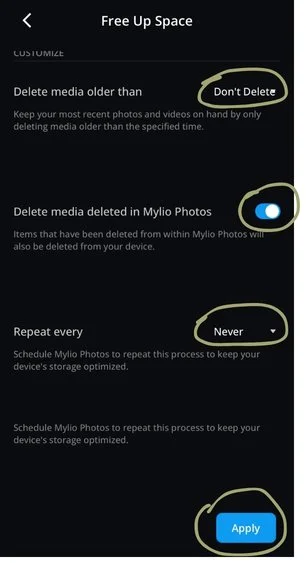

6.) Mylio will now take any photos that you deleted inside of Mylio, that originated from your phone, and it will move them to the trash can in your phone’s camera roll as well.